
 EN
EN JA
JA

Key Takeaways
- Structure-Aware Processing: VisionRAG uses LLM-based Intelligent Chunking to preserve document hierarchy, maintain cross-page continuity, and link embedded visuals with text explanations.
- Intent-Driven Queries: Query Reformulation uses concept vocabulary extracted during chunking to rephrase conversational questions into precise domain terms before retrieval.
- Dual Retrieval Strategy: Combines vector search for conceptual meaning with BM25 keyword matching for exact codes, merging results via Reciprocal Rank Fusion (RRF) or Alpha Blending.
- Resilient Precision: Integrates Cohere Rerank to surface top-5 relevant contexts while using exponential backoff fallback mechanisms to protect uptime if external APIs fail.
- Native Multimodal Search: Expands RAG capabilities to visual data, allowing users to search, analyze, and verify compliance using images, charts, and technical diagrams.
Introduction
Imagine asking an AI assistant a question about your company’s policies, reports, or product documents. You expect a clear answer based on the information available inside your organisation.
But what if the information is buried in a long PDF? What if the document contains charts and images? Or what if the AI cannot find the right answer because you used different words from those in the original document?
These are common challenges with Retrieval-Augmented Generation (RAG), a technology that helps AI systems find information from a company’s own documents before generating an answer.
Building a RAG system is one thing. Making it work reliably with complex documents, different types of questions, and unexpected technical failures is another.
To address these challenges, Blue Caffeine Labs developed VisionRAG, a solution designed to help AI systems find relevant information, understand documents more effectively, and continue working when certain services fail.
Let’s explore how it works, step by step.
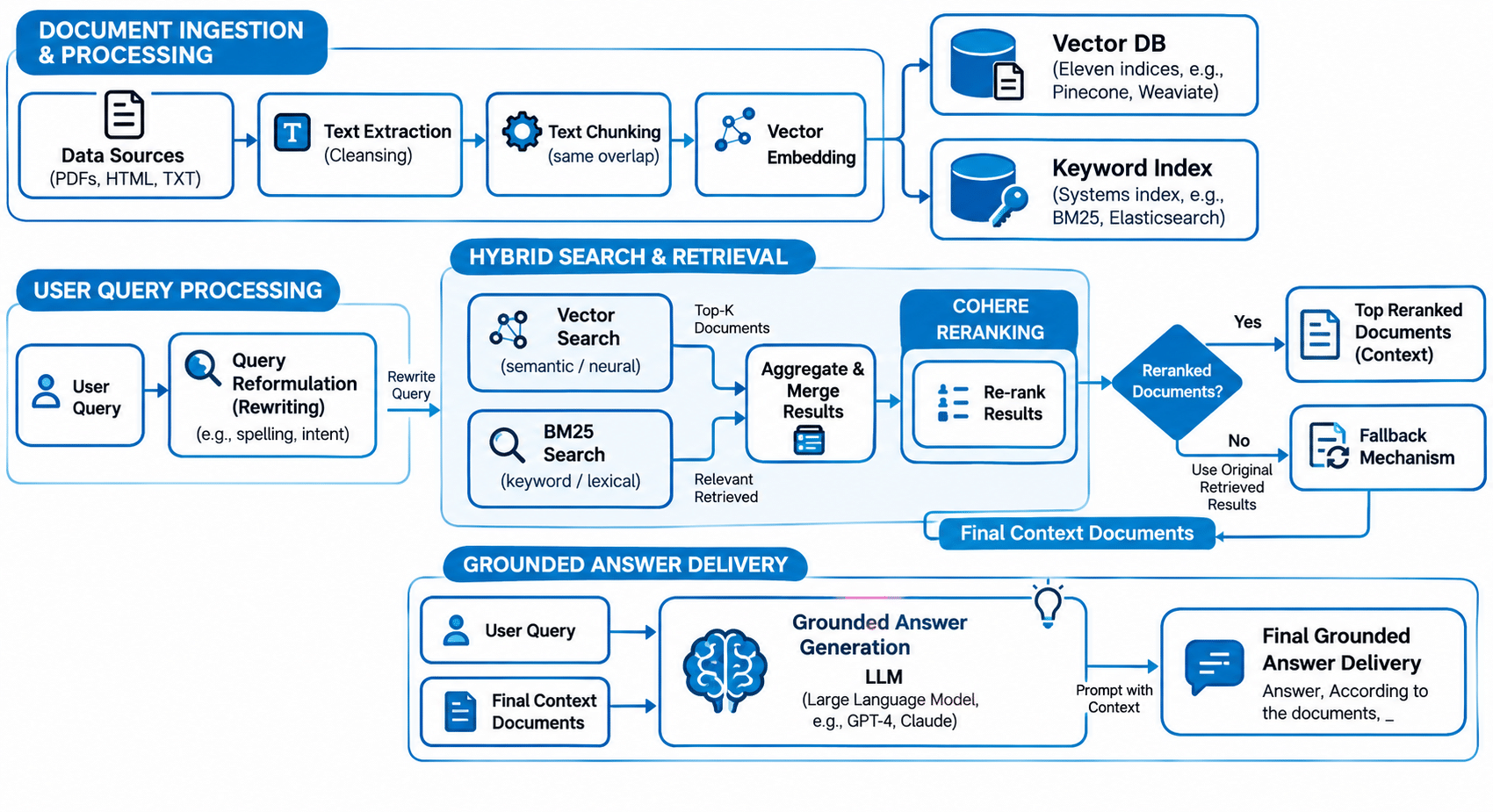
1. Intelligent Chunking: Preserving Document Meaning at Scale
Traditional RAG implementations rely on rigid, fixed-length character or token counts to split documents. This arbitrary slicing destroys document structure, breaks paragraphs mid-thought, separates figures from their explanatory text, and creates context-less text fragments that degrade retrieval accuracy at scale.
VisionRAG replaces crude text splitting with LLM-Based Intelligent Chunking—an approach designed to understand document structure and keep related ideas together.
Core Capabilities of Intelligent Chunking
- High-Confidence OCR Correction: Detects and corrects text recognition errors on scanned files and image based PDFs before chunking occurs.
- Cross Page Continuity: Tracks ideas and sentences that span across page breaks so context isn’t lost at arbitrary margins.
- Smart Chunk Overlap: Dynamically preserves contextual context across adjacent chunk boundaries.
- Image Text Association: Automatically couples embedded charts, diagrams, and visual illustrations with their surrounding explanatory text.
- Semantic Summaries & Metadata: Auto-generates concise contextual summaries for each chunk, enriching retrieval metadata for better downstream matching.
- Concept Vocabulary Extraction: Extracts key concepts and domain terms per chunk, building a specialized index that fuels query reformulation.
Why this matters: When text chunks reflect natural semantic boundaries rather than arbitrary character limits, your AI model gets full, coherent context leading to significantly higher accuracy and grounded answer generation.
2. Helping AI Understand Documents Better
Think about reading a long report that contains several sections, tables, and images. If someone cuts the report into random pieces, a paragraph might lose its meaning, or a chart might become separated from the explanation that makes it useful.
Basic document-processing systems can face the same problem. They often divide documents into fixed-length sections, regardless of where one idea ends and another begins.
VisionRAG takes a smarter approach. It uses AI to divide documents into smaller sections based on their meaning and context.
Here’s how that helps:
- Corrects scanning errors: Fixes common text recognition mistakes in scanned documents, where possible.
- Keeps information connected: Preserves the flow of a paragraph or section that continues across multiple pages.
- Retains important context: Includes relevant information from neighbouring sections so that details don’t lose their meaning.
- Connects images to explanations: Keeps charts, diagrams, and other visuals linked to the text that explains them.
- Creates short summaries: Generates brief descriptions of each section to make relevant information easier to find.
- Identifies important terms: Extracts key words and concepts that can help the system locate information later.
Why this matters: When documents are organised around their meaning, the AI has a better chance of finding the right information without losing important context.
3. Understanding What People Really Mean When They Search
People don’t always use the same language as the documents they’re searching.
For example, an employee might ask, “How many days off can I take?” while the company’s policy document uses the term “annual leave entitlement.”
A basic search may struggle to connect these two phrases, even though they’re about the same thing.
VisionRAG addresses this through Query Reformulation, which improves a question before the system searches for an answer.
It does this in four ways:
- Adds related terms: Includes relevant words and industry terminology that may appear in the documents.
- Identifies the main topic: Focuses on the central subject when a question is broad or unclear.
- Rephrases the question: Converts informal wording into terms that are easier to match with the available information.
- Understands the intent: Looks beyond individual words to identify what the person is trying to find out.
VisionRAG also uses key concepts identified during document processing to help guide these searches.
Why this matters: People can ask questions naturally instead of needing to know the exact terminology used in company documents.
4. Finding the Right Information Through Two Types of Search
Even when a question is clear, finding the right information can be difficult.
Imagine searching for a product using its general description. You might find documents about similar products but miss the exact model number you need. On the other hand, searching only for an exact word may miss a document that explains the same idea using different language.
VisionRAG combines two search methods to reduce these gaps.
Vector search: Finds information by meaning
This method looks for information related to the idea behind a question, even when the wording is different.
For example, a search for “reducing electricity bills” may find a document discussing “energy efficiency” because the concepts are related.
BM25 keyword search: Finds information by matching words
This method looks for specific terms and phrases. It’s particularly useful when searching for product codes, technical names, or exact wording.
VisionRAG combines the results from both methods to create a more useful list of potential answers. It can use either Reciprocal Rank Fusion (RRF), which combines the rankings from both searches, or Alpha Blending, which allows administrators to adjust how much importance each search method receives.
Why this matters: Combining searches by meaning and searches by exact wording helps the system find relevant information that either method might miss on its own.
5. Choosing the Best Results and Handling Failures
Finding relevant documents is only part of the process. The system must also decide which results are most useful for answering the question.
VisionRAG uses the Cohere Rerank API to examine the search results more closely. It compares each candidate with the user’s question and reorders the results so that the most relevant information appears first.
However, external services can sometimes slow down, reach usage limits, or become temporarily unavailable. If the system depends entirely on one service, these problems can interrupt the search process.
VisionRAG includes a fallback mechanism to help prevent that.
Here’s how it works:
- Checks whether reranking is needed: The system checks whether reranking is enabled, whether an offline client is available, and whether there are enough results to make reranking useful.
- Attempts to improve the results: If the necessary conditions are met, it sends the candidate results to the Cohere Rerank API.
- Retries when something goes wrong: If the request fails, the system waits before trying again. Each successive wait can be longer, a method known as exponential backoff.
- Falls back to existing rankings: If the service continues to fail, the system uses the rankings it already has instead of repeatedly attempting the failed operation.
Why this matters: A temporary problem with an external service doesn’t automatically bring the entire search process to a halt. The system can continue using the results already available, although their relevance may not be as well refined as it would be after successful reranking.
6. Unlocking Multimodal Intelligence with Image Understanding
Company knowledge isn’t limited to plain text; it lives in complex financial charts, architectural diagrams, operational flowcharts, product catalogs, and visual documentation. Traditional RAG systems are blind to these formats, treating visual data as unsearchable black boxes.
VisionRAG addresses this gap with native Image Input Understanding, allowing users to upload visual assets alongside text queries to retrieve precise, image-grounded answers.
Here’s how visual intelligence expands what enterprise AI can do:
- Visual Search & Similarity: Users can upload a product photograph or design asset to instantly retrieve matching technical specifications, stock details, or related inventory without relying on precise text descriptions.
- Compliance & Brand Audits: Teams can submit images of physical setups such as retail point-of-purchase (POP) displays or field installations and automatically compare them against visual brand guidelines or regulatory standards.
- Diagram & Chart Interpretation: VisionRAG analyzes complex infographics, schematics, and embedded PDF tables directly, extracting meaningful context from visual data that text-only extractors typically miss.
Why this matters: By bridging text retrieval with visual analysis, AI search becomes truly multimodal, allowing teams to search, cross reference, and analyze company knowledge regardless of the format it lives in.
Intelligent Auto Grounding: Creates questions to test the system
The system automatically generates sample questions and answers from available documents. These can be used to check whether the system retrieves the right information and produces answers supported by the source material.
Conclusion
A useful enterprise AI system needs to do more than generate fluent answers. It must find the right information, preserve context, understand different ways of asking questions, and handle technical problems without unnecessarily interrupting the user.
VisionRAG brings these capabilities together in one pipeline.
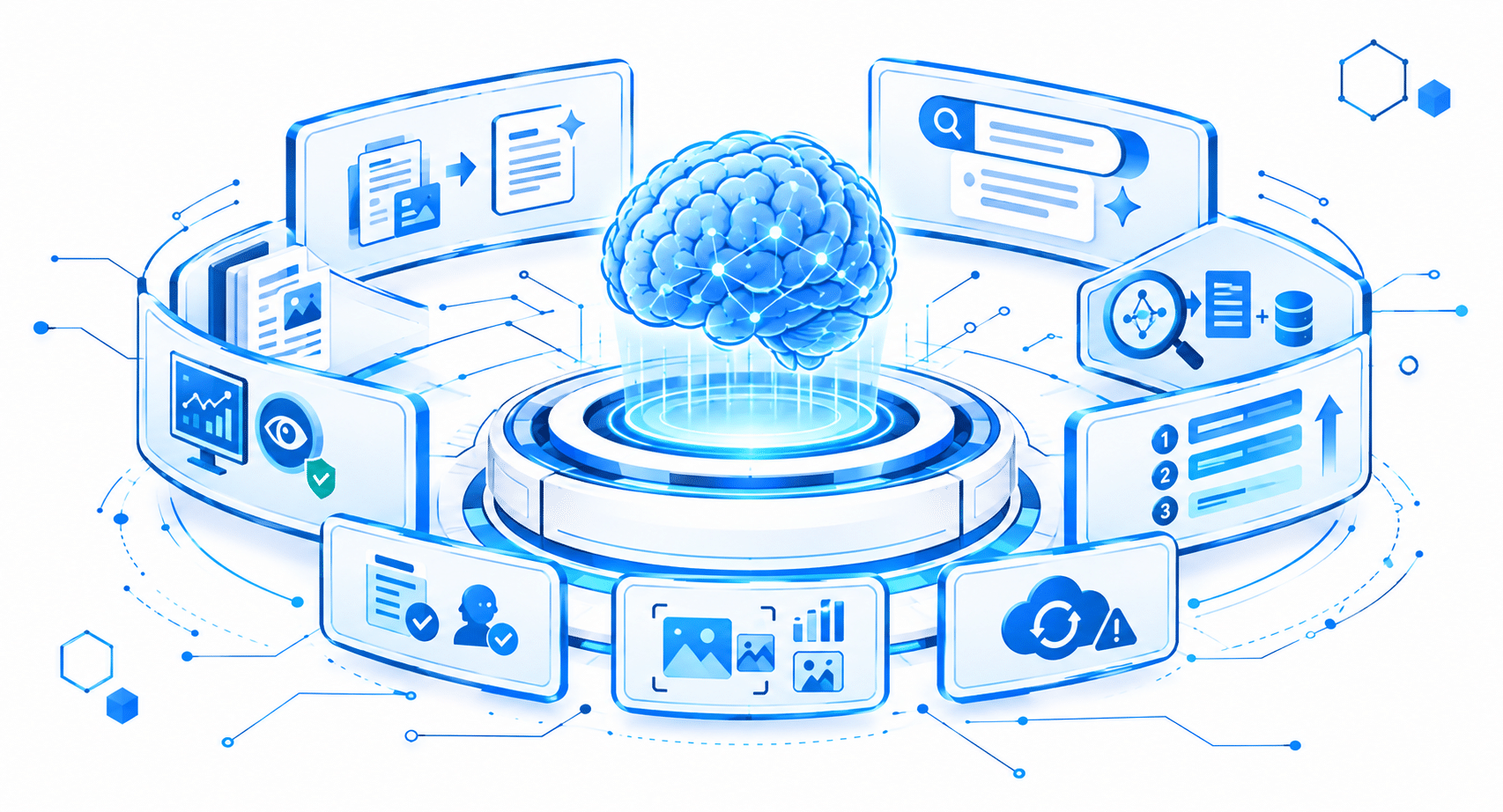
Its intelligent document processing helps preserve meaning. Query reformulation makes searches more effective. Hybrid search combines conceptual understanding with exact keyword matching. Reranking improves the order of search results, while fallback mechanisms help the system continue when external services fail. Image understanding, answer evaluation, and monitoring add further support for real-world use.
Together, these capabilities provide a foundation for building more reliable AI powered information retrieval systems for businesses.
The goal is simple: Help AI find the information that matters, use it in context, and deliver answers that people can rely on.
Frequently Asked Questions
How does Intelligent Chunking differ from traditional text splitting?
Traditional splitting relies on fixed character or token counts, often cutting sentences or separating images from their descriptions. VisionRAG uses LLM-based Intelligent Chunking to respect document boundaries, maintain cross-page context, and auto-generate summaries and concept metadata for each chunk.
How does Query Reformulation help when users ask vague questions?
Users rarely search using the exact wording found in official documents. Query Reformulation analyzes user intent, rephrases informal language, and expands queries with domain terminology extracted from the document corpus to improve retrieval accuracy.
Why does VisionRAG use both Vector and BM25 search?
Single retrieval methods leave blind spots. Vector search excels at finding conceptual meaning, while BM25 keyword search catches exact matches like part numbers or specific codes. Combining both ensures high recall for both broad ideas and exact terms.
What happens if an external service like Cohere Rerank experiences downtime?
VisionRAG includes a built-in fallback system. If an external API call fails, the pipeline uses exponential backoff retries. If the service remains unreachable, it falls back to the initial hybrid search rankings so the application continues to respond without interruption.
Can VisionRAG process visual assets like diagrams, photos, or physical product setups?
Yes. VisionRAG features native Image Input Understanding, allowing users to perform visual similarity searches, interpret complex diagrams and charts, and automate visual compliance audits against brand or regulatory guidelines.


